

According to Anthropic’s 2026 Agentic Coding Trends Report, developers now use AI in roughly 60% of their work, but report being able to fully delegate only between 0% and 20% of their tasks.
What’s more, about a quarter of AI-assisted work consists of tasks that wouldn’t have been attempted at all without AI in the loop.
These numbers describe a structural rearrangement of how software gets built. AI coding tools are expanding the surface area of software development by enabling more features and integrations to be built.
In tandem, the act of writing code is no longer the center of the work, as the bottleneck has moved from typing to reviewing, orchestrating, and validating AI-generated outputs.
What is changing is not just how much code gets written, but how it gets written. Software is becoming more iterative, more agent-driven, and less tied to a single developer working line by line.
At the centre of this are AI agents, systems that can take a goal and work toward it with limited supervision.
What Are AI Coding Agents (and How They Differ from Assistants)?
A coding agent is a system that receives a goal and pursues it.
You describe what you want to accomplish, and the agent plans the steps, writes code across multiple files, runs tests, fixes what breaks, and keeps iterating until the task is complete or it hits a real constraint. It does all of this within a continuous run, without needing step-by-step human direction.
AI agents and AI assistants are often grouped together, but they operate very differently.
An AI assistant is reactive. You ask for something, it gives you something, and the loop closes there. Tools like GitHub Copilot work this way: you type, it suggests, you accept or reject. Every decision stays with the developer, and the tool’s job is to make each step faster.
An agent, on the other hand, is autonomous within a goal. You describe the outcome, and the system decides how to get there. Tools like Claude Code, OpenAI Codex, Devin, and Cursor operate in this category.
One research separates the two along four dimensions:
- Autonomy (does it require continuous guidance)
- Scope (does it operate on one file or the whole repository)
- Planning (can it break a goal into subtasks and sequence them)
- Interaction (does it surface inline suggestions or full pull requests)
This matters operationally because as autonomy increases, so does blast radius.
Internal Architecture of AI Coding Agents
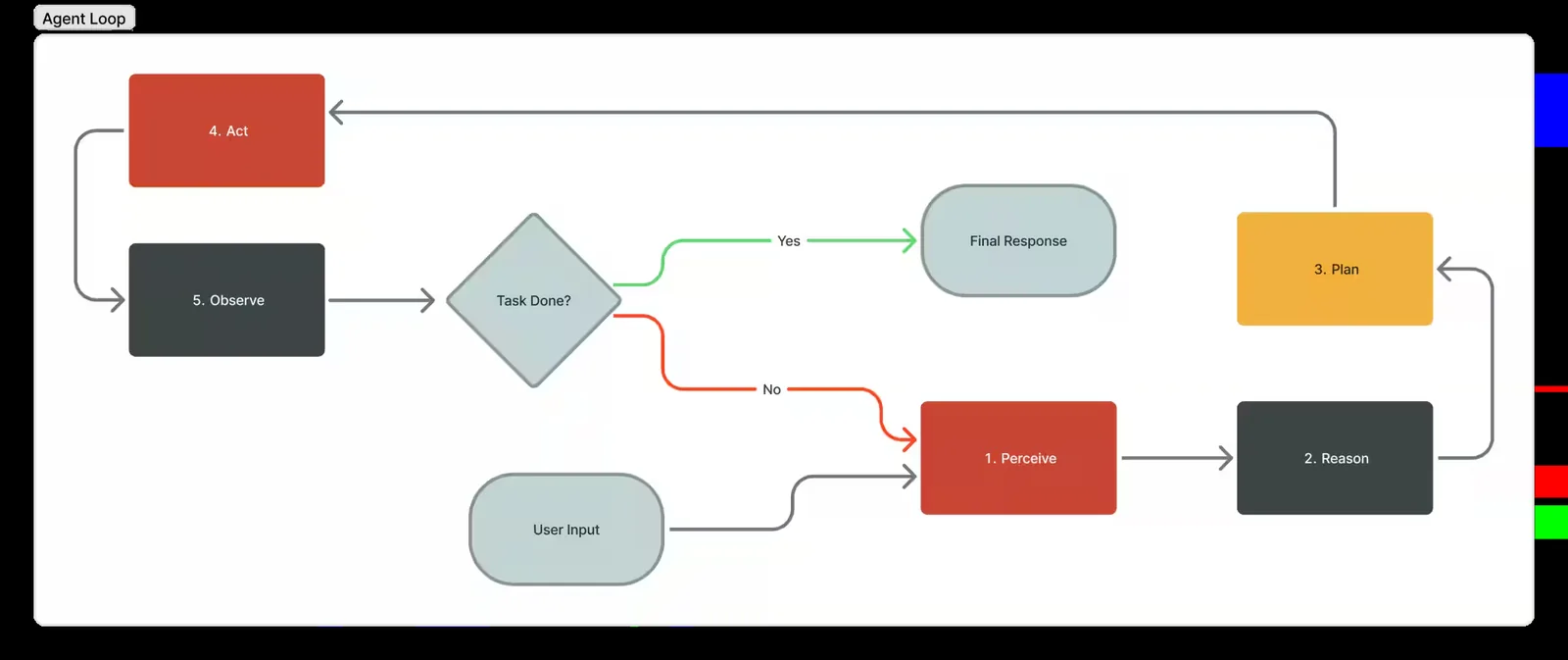
Modern coding agents follow a common architecture often referred to as the agent loop.
Source: Oracle
The shape of the loop is straightforward. It describes one, where the agent assembles context from whatever inputs are available, reasons through it, executes an action, and then observes the result.
That result is fed back into the next step, allowing the agent to adjust and continue. The cycle repeats until the task is complete or no further progress can be made.
What makes this different from earlier code generation is that the agent is not trying to solve the whole problem in a single output. It takes a small step, observes the consequences, and adjusts. The behaviour resembles, in a rough but unmistakable way, how an experienced engineer debugs an unfamiliar system.
There are some components in this function:
The Reasoning Engine
At the heart of every coding agent is a large language model (LLM). The model is what turns a goal into a sequence of intermediate decisions: which file to open first, which hypothesis to test, which command to run next.
Reasoning, sometimes presented as “thinking” in product UIs, is the model’s ability to spend additional tokens working through a problem before committing to an action. As Simon Willison notes, this is particularly useful in coding contexts because debugging often requires navigating complex code paths and the model needs space to follow the threads back to the source of an issue.
A better model produces a better reasoning trace, and a better reasoning trace produces better tool calls, which produces better outcomes downstream.
Tool Use And Execution Layer
The model on its own is just a text generator. What makes it agentic is the execution layer that translates model outputs into structured tool calls and runs them against a real environment.
This layer exposes capabilities such as file system access, terminal execution, test runners, and version control operations. The model emits a structured action, for example editing a file or invoking a command, and the system executes it in a controlled context, then returns the output.
Context And Memory
Current coding agents maintain a working memory of every observation, tool call, and decision, and feed that history forward into each subsequent reasoning step. With large context windows, the agent can hold substantial parts of a codebase in memory and reason across the system rather than isolated fragments.
But it’s also where one of the most consistent failure modes lives. Practitioners call it context rot, which is the tendency for an agent’s grasp of a problem to deteriorate the longer it has been working, as the context grows beyond what the model can reliably attend to.
A misunderstood goal at step two can drive twenty subsequent steps in the wrong direction without the agent noticing, while the resulting code looks entirely reasonable on the surface.
The Risks Accumulate Where They Are Hardest to See
Once an organization deploys agents at scale, the risk rarely shows up as a single dramatic failure.
It’s a slow accumulation of small ones, but persistent enough that the cumulative effect reshapes the codebase over months. Most of the serious risk profile of these tools sits in this band.
Security Flaws That Compound Across the Codebase
The most studied of these is security. Veracode’s 2025 GenAI Code Security Report, which tested over 100 large language models across Java, JavaScript, Python, and C#, found that AI-generated code introduced security flaws aligned with the OWASP Top 10 in 45% of cases.
How Secure Is the Code Generated by AI?
AI models introduced a risky security vulnerability in 45% of tests.
45%
Source: Veracode
The more consequential finding, though, is that security performance remained flat regardless of model size or release date. While newer models generated syntactically cleaner code, they were not measurably generating more secure code.
This happens because most models train on the same body of public code, much of which contains the same patterns of unresolved security flaws.
Hallucinations And Phantom Dependencies
Hallucinations in code output are not always the obvious kind.
An agent that generates code failing to compile is easy to catch. The more concerning pattern is output that looks correct, passes surface-level review, and breaks later in ways that are difficult to trace.
One example of this is package hallucination: agents recommending non-existent libraries that, in supply chain attacks, malicious actors register under the exact name the model invented.
Researchers have documented this attack vector being actively exploited, with open-source models hallucinating package names in up to 21.7% of suggestions and commercial models in around 5.2% of cases.
Code Bloat and Technical Debt
Code volume is another compounding pressure.
Coding agents tend to generate new code rather than refactor or reuse what already exists. Researchers have noted that this default behavior produces bloat and accelerated technical debt.
This is because an agent’s objective is to complete the task in front of it. Whether the codebase it leaves behind is lean, consistent, and maintainable is not part of its goal unless you explicitly make it so.
Adoption Is Outpacing the Organization
According to Faros AI’s 2026 engineering report, drawing on two years of data from 22,000 developers across 4,000 teams, task throughput per developer is up 33.7%, epics completed per developer are up 66.2%, and tasks involving code specifically rose 210% at the team level.
For an individual developer, that translates directly into felt experience. Repetitive work moves faster, and boilerplate gets handled without friction.
The difficulty is that software development does not end when a developer finishes writing code. It ends when that code has been reviewed, tested, and shipped to production without breaking anything. And it is at those downstream stages that the picture starts to look very different.
When more code enters a pipeline, someone has to review it before it can be merged. Reviewers are human and do not scale at the same rate as an agent writing code at speed.
The data shows PR review time has increased 441.5% at the median.
As a result, 31.3% more pull requests are being merged without any review at all, and the quality consequences of that are showing up in production. Bugs per developer are up 54% and the ratio of incidents to pull requests merged has more than tripled.
Developers do not tend to see this because the strain accumulates downstream, after they have moved on to the next task. The Faros report calls this the Acceleration Whiplash: AI has flooded a system built around human-paced development with output it was never designed to absorb.
A separate randomized controlled trial published in 2025 found that experienced developers given access to AI tools on complex tasks in mature codebases took 19% longer to complete their work than those with no AI access, despite predicting the tools would speed them up by around 24%.
The explanation points to the fact that complex work in a mature codebase requires understanding why things were built a particular way. That kind of contextual knowledge accumulates over years and matters.
Best Practices for Teams Adopting Coding Agents
The teams that are getting genuine value from coding agents tend to share a small number of best practices.
Treat Agent Output As the Start of Review, Not the End
Speed is the point of agents, but it’s also where the exposure accumulates. The faster code enters a codebase, the faster unreviewed assumptions become load-bearing ones.
An agent working through a backlog of tasks does not slow down because a particular change feels risky. It has no stake in whether the code behaves correctly in production, or any awareness of downstream consequences.
Closing this gap means treating review capacity as a first-order concern when adopting agents, not an afterthought.
Match the Tool to the Task
Bounded, well-specified tasks are where agents consistently earn their keep.
The more clearly defined the input and the expected output, the less room there is for the agent to make consequential decisions on your behalf.
Build Governance Before Scale, Not After
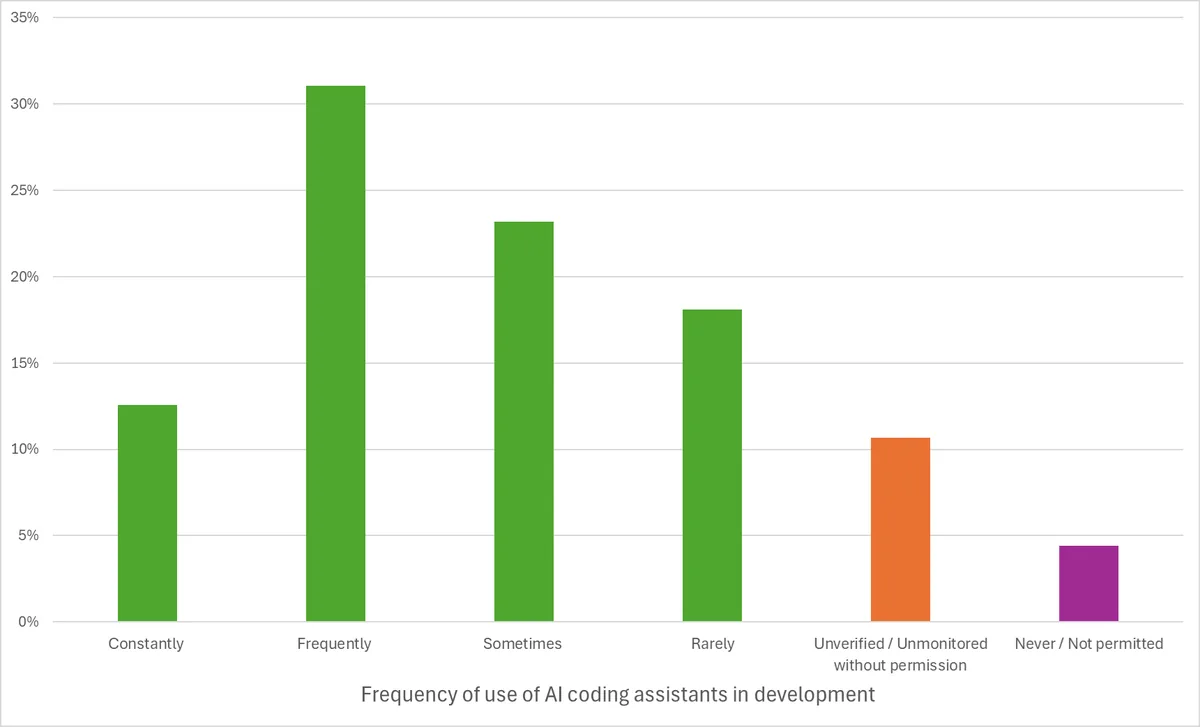
One survey found that 57% of organizations acknowledge that AI coding tools introduce security risks or make vulnerabilities harder to identify.
Yet 11% either know or suspect AI is already being used in their development pipelines and are not actively monitoring it.
Source: Black Duck
That is a meaningful gap between awareness and action. Without visibility into how agents are being used, organizations cannot assess what is being generated, what dependencies are being introduced, or what has shipped without adequate review.
This is why governance needs to come in early, before agent usage becomes load-bearing across teams.
Invest in the Skills to Use Agents Well
Agents do not make expertise redundant. They make it more consequential.
A developer who understands the codebase, knows what good output looks like, and can spot when something feels off will get substantially more value from an agent than one who cannot.
That capability develops over time, through repeated use, deliberate reflection on what worked and what did not, and a growing intuition for where agents tend to cut corners or make plausible-looking mistakes.
How GAP Helps Teams Get This Right
For many organizations, the challenge is not awareness of these tools.
It is integration: bringing capable agents into engineering workflows in a way that captures productivity gains without creating compliance exposure, security debt, or operational bottlenecks.
GAP gives engineering leaders a structured path through this. It helps identify where coding agents create value in a specific environment, surfaces organizational and technical readiness gaps, and builds an adoption roadmap grounded in the realities of the business rather than a generic playbook.
If you want to assess where your team stands with agentic coding, reach out to a GAP expert to start the conversation.